
- Company
Managing salesperson commissions can become complicated when businesses use different commission rates for products, customers, discounts, and sales targets. Manual commission calculations can also lead to errors, delayed payouts, and unnecessary work for sales and finance teams.
Sales Commission Manager for Odoo 19 helps businesses automate the complete sales commission lifecycle. From defining flexible commission rules to automatically calculating commissions and generating draft vendor bills, the module brings commission management directly into Odoo.
With Standard, Partner-based, Product-based, and Discount-based commission rules, configurable calculation triggers, and powerful List, Kanban, Graph, and Pivot views, businesses can gain better control and visibility over salesperson commissions.
Sales Commission Manager is an Odoo 19 module designed to automate salesperson commission calculations and payout workflows.
Instead of maintaining commission calculations in spreadsheets or calculating each salesperson's earnings manually, businesses can configure commission rules directly in Odoo.
The module supports commission calculations based on:
Businesses can also decide when a commission should be generated:
This flexibility allows companies to align commission calculations with their existing sales and accounting processes.
Sales commissions are often linked to different business conditions. One salesperson may receive a standard percentage, while another may have different rates for specific products or customer categories.
Manual commission calculations can result in:
With sales commission automation in Odoo, commission calculations can happen automatically based on predefined rules.
This allows sales teams to focus on selling while finance teams spend less time calculating and verifying commissions.
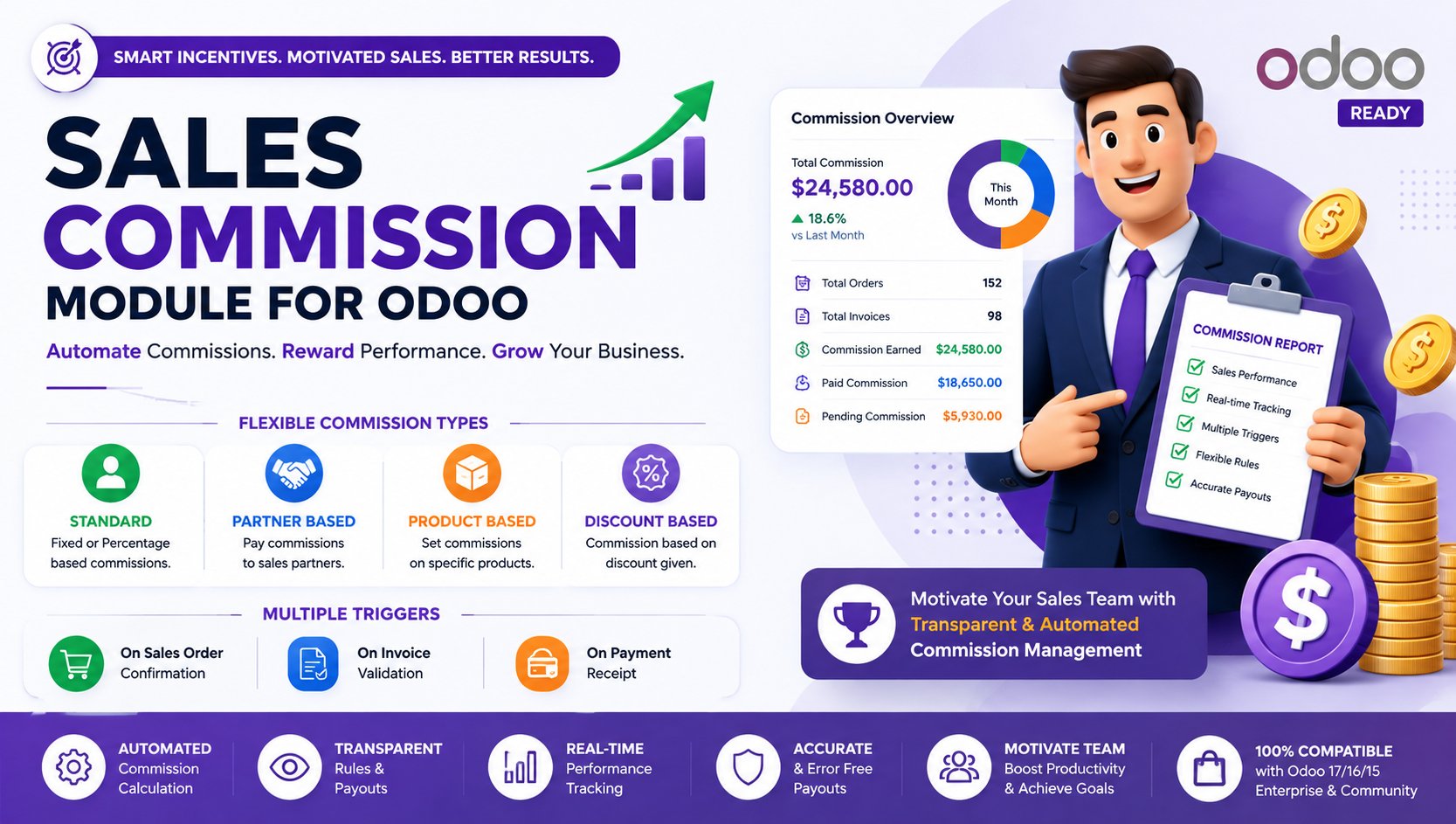
The module supports four major commission structures.
Standard Commission
Set a standard percentage for salesperson commissions.
For example, a business can configure a 5% commission for eligible sales.
The system can automatically calculate the commission based on the configured rule and trigger.
Commission rates can be different depending on the customer's partner category.
For example:
This makes the module useful for businesses that maintain different customer or partner relationships.
Businesses can define commissions based on individual product lines.
The product commission can be calculated using the product line subtotal.
The calculation considers:
Quantity × Unit Price × (1 − Discount)
This allows commission calculations to reflect the actual discounted value of the product line.
Commission rules can also be configured according to discount levels.
This can help businesses control commissions when salespeople offer different discounts to customers.
For example, a company could configure different commission rates based on predefined discount thresholds.
One of the most important features of the Sales Commission Manager is the ability to choose when commissions are calculated.
The trigger can be configured directly from Odoo Sales Settings.
Generate commission lines when the Sales Order is confirmed.
This can be useful for businesses that reward salespeople immediately after securing an order.
Calculate commissions when the related customer invoice is posted.
This provides a closer connection between sales and accounting.
Generate commissions only after the customer payment has been registered.
This approach can be useful for businesses that want to pay salespeople based on actual customer collections rather than simply booked sales.
Different businesses have different commission policies.
Some reward salespeople when an order is confirmed. Others only release commissions after invoicing or payment collection.
With configurable triggers, businesses don't have to adapt their commission policy to a fixed workflow.
Instead, they can configure Odoo according to their internal process.
Once commission rules and triggers are configured, the system can automatically calculate eligible commissions.
Define Rules → Select Trigger → Sales Activity → Automatic Commission Calculation
For example:
1. A salesperson confirms a Sales Order.
2. The configured commission trigger is checked.
3. The applicable commission rule is identified.
4. The commission is calculated.
5. A commission line is generated.
6. The commission can be reviewed and converted into a draft Vendor Bill.
This reduces repetitive manual calculations and creates a consistent commission workflow.
Understanding how much commission each salesperson has earned is important for both sales managers and finance teams.
The module provides multiple views to analyze commission data.
The List View provides a detailed overview of commission records.
Users can review information such as:
Kanban cards provide a visual way to monitor commission records and their workflow.
This can make it easier for sales and finance teams to organize and review commission activities.
Graph analytics allow managers to visualize commission amounts.
Businesses can use bar charts to compare commission volumes across salespeople or analyze commission trends.
Pivot analytics provide multidimensional commission reporting.
Managers can analyze commission data based on different dimensions and get a deeper understanding of sales performance and commission costs.
A key feature of the Sales Commission Manager is automated Vendor Bill creation for salespersons.
Once commission lines have been calculated and reviewed, users can select the relevant commission lines and choose:
Actions → Create Bill
The system generates a draft Vendor Bill for the salesperson.
This creates a smoother connection between commission management and accounting.
The module integrates commission configuration directly into Odoo Sales Settings.
Administrators can select the preferred commission calculation trigger from the settings.
This provides centralized control over whether commissions are generated on:
Order Confirmation → Invoice Posting → Payment Registration
Instead of configuring commission timing separately for every transaction, businesses can manage the core trigger from the Sales configuration.
Product-based commissions need to account for quantities, pricing, and discounts.
The module calculates product subtotal commissions using the relevant order line subtotal.
The calculation is based on:
Quantity × Unit Price × (1 − Discount)
This means commissions can be calculated against the actual discounted product value rather than simply using the original product price.
This provides more accurate commission calculations for businesses where discounts are common.
The complete workflow can be divided into three simple stages.
Configure commission structures based on:
Choose when commissions should be generated:
The module then calculates applicable commissions according to the configured rules.
Review the generated commission lines.
Select the required records and use the Create Bill action to generate draft Vendor Bills for salesperson commission payouts.
This connects sales commission management with the accounting workflow.
Automated rules eliminate the need to calculate every salesperson's commission manually.
Predefined formulas and rules help maintain consistency across commission calculations.
Draft Vendor Bills can be generated directly from commission lines.
List, Kanban, Graph, and Pivot views provide different ways to monitor commission data.
Businesses can manage standard, partner-based, product-based, and discount-based commissions.
The payment registration trigger allows businesses to calculate commissions only after customer payments are received.
Our other app - Payment Follow-up Management in Odoo: Simplify Receivables, Payables & Cash Flow
Sales teams can use automated commission calculations to understand their earned commissions and maintain greater transparency.
Companies that work with affiliated and non-affiliated customers can configure different commission rates for each category.
Businesses selling multiple products with different commission rates can automate product-level commission calculations.
Companies that frequently negotiate discounts can configure commission rules based on discount thresholds.
Finance departments can review commission records and generate draft Vendor Bills without manually creating accounting entries.
Companies that release commissions only after customer payment can use the payment registration trigger to align sales incentives with actual cash collection.
This Odoo module is particularly useful for:
Odoo already connects Sales, Invoicing, Accounting, and customer information within one platform.
Sales Commission Manager builds on this connected environment by bringing commission calculations and payout management into the same workflow.
Instead of moving sales data to spreadsheets, manually calculating commissions, and creating separate accounting entries, businesses can manage the process inside Odoo.
This creates a more connected workflow:
Sales → Commission → Analysis → Vendor Bill → Payout
Managing salesperson commissions doesn't have to involve complicated spreadsheets or repetitive calculations.
Sales Commission Manager for Odoo 19 automates commission calculations using flexible Standard, Partner, Product, and Discount-based rules while allowing businesses to choose when commissions should be generated.
With automated calculations, product subtotal formulas, partner-based rates, configurable triggers, analytical reporting, and one-click Vendor Bill creation, the module provides a complete solution for sales commission management in Odoo.
Whether commissions are based on orders, invoices, customer payments, products, partners, or discounts, businesses can create a structured and transparent commission workflow that connects sales performance with accounting.
Sales Commission Manager is an Odoo 19 module that automates salesperson commission calculations, reporting, and payout workflows using configurable commission rules.
The module supports four commission types: Standard %, Partner-based, Product Subtotal %, and Discount-based commissions.
Businesses can configure commissions to be generated when a Sales Order is confirmed, an Invoice is posted, or a Payment is registered.
Yes. Users can select commission lines and use the Create Bill action to automatically generate draft Vendor Bills for salesperson commission payouts.
Yes. Commission records can be analyzed through List, Kanban, Graph, and Pivot views, making it easier to monitor commission amounts and salesperson performance.
Let Odoo take your business to the next level!
Contact us and take the next step!
Follow Our Adventures!

Ready to launch your next project?
Company
Copyright © 2020. micra.digital. All rights reserved.