- Company
Managing overdue payments is an essential part of maintaining healthy business cash flow. However, when customer receivables and vendor payables are tracked manually through spreadsheets, emails, phone calls, and separate communication tools, payment follow-ups can quickly become difficult to manage.
Payment Follow-up Management in Odoo provides a centralized way to manage customer payments, vendor bills, follow-up activities, payment promises, communication history, and team responsibilities.
With an interactive OWL KPI dashboard, automated invoice and bill synchronization, team assignment, communication logs, smart scheduling, and audit tracking, businesses can bring their entire payment follow-up process into one organized system.
Payment Follow-up Management is a structured system for tracking money that a business needs to collect from customers and pay to vendors.
Instead of manually checking overdue invoices and maintaining separate follow-up spreadsheets, the Payment Follow-up module creates a centralized workflow inside Odoo.
It helps teams:
This makes payment collection and payment scheduling more systematic and transparent.
Late customer payments can directly affect working capital and day-to-day operations. At the same time, businesses need to manage vendor payments carefully to maintain supplier relationships and avoid unnecessary penalties.
Without a proper follow-up process, teams may:
A centralized Odoo payment follow-up system helps teams stay organized and act on payment-related tasks at the right time.
One key advantage of Payment Follow-up Management is that it brings both sides of the payment cycle into one system.
Track money that customers still need to pay.
Teams can identify:
Track money the business needs to pay to suppliers.
Teams can monitor:
By managing receivables and payables together, businesses get a clearer view of expected cash inflows and outflows.
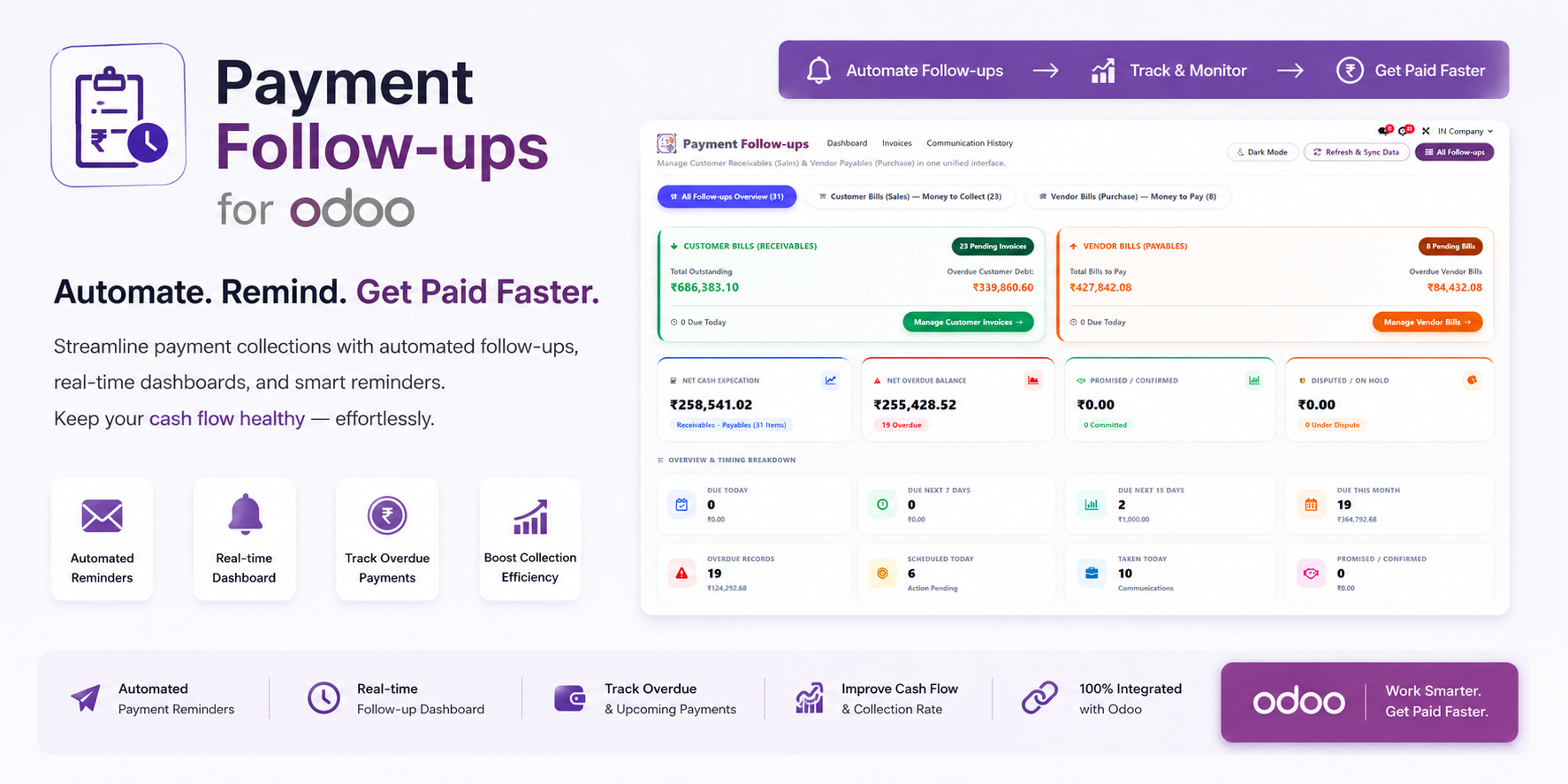
The module includes an interactive OWL dashboard that provides real-time payment follow-up insights.
Instead of checking multiple screens, managers can view important payment KPIs from a centralized dashboard.
This provides business owners, accountants, finance managers, and collection teams with a quick overview of their payment position.
Knowing how much money is expected to come in and how much needs to go out is important for financial planning.
The dashboard helps businesses compare:
Money to Collect − Money to Pay = Expected Net Cash Position
This provides a more practical view of upcoming cash requirements and helps management make informed decisions.
Manual creation of follow-up records can take time and may lead to missed entries.
The Payment Follow-up module automatically synchronizes relevant Odoo invoices and vendor bills.
When a customer invoice or vendor bill is posted in Odoo, the corresponding follow-up record can be created and synchronized automatically.
This means users don't need to manually enter every invoice or bill into a separate payment tracking system.
The result is a more connected and efficient workflow.
A structured follow-up process helps teams consistently manage overdue payments.
The workflow can be divided into three simple steps.
Posted customer invoices and vendor bills are synchronized into the payment follow-up system.
Users can open the follow-up record and log their interaction using the communication wizard.
They can record:
Managers can use the OWL dashboard to monitor:
This creates a continuous payment follow-up cycle from invoice creation to payment collection.
Payment collection is not only about sending reminders. Teams often have multiple conversations with the same customer before an invoice is paid.
The communication log helps preserve this history.
Users can record the communication channel and important details from every follow-up.
Teams can also document payment commitments and disputes so that future follow-ups are based on previous conversations.
This creates a centralized history instead of relying on individual employees' memories or separate communication tools.
Customers may provide a specific date or amount when they promise to make a payment.
Payment Follow-up Management allows users to record these commitments.
For example:
Promised Amount: $5,000
Promised Date: 15 September
Next Follow-up: 16 September
This gives collection teams a clear reference point for their next action.
It also helps managers identify promised payments that have not been received.
Missing a follow-up date can delay collections.
The module allows users to schedule the next follow-up directly from the workflow.
Teams can organize follow-ups based on:
Calendar-based scheduling makes it easier for employees to prioritize the right accounts at the right time.
A clean daily task list helps teams focus on active payment cases.
When a payment is completed, or a follow-up is rescheduled for a future date, the record can automatically be cleared from the Today's Follow-ups queue.
This prevents users from spending time on already-resolved or postponed tasks.
Payment follow-up activities often involve multiple sales representatives, collection agents, accountants, and managers.
The module supports user assignment and role-based visibility.
Sales or collection team members can be restricted to the records assigned to them.
This gives each user a focused worklist without unnecessary records from other team members.
Managers can maintain broader visibility across team records.
They can monitor:
This creates a balance between individual responsibility and management oversight.
Every follow-up activity can create an audit record containing important information about the action.
The history can include:
Maintaining an audit trail makes it easier to understand what actions have already been taken on an account.
It also improves accountability across payment collection teams.
Get real-time KPIs for receivables, payables, overdue amounts, promised payments, follow-ups, and expected cash.
Manage customer collections and vendor payment commitments from one centralized system.
Automatically bring posted customer invoices and vendor bills into the follow-up workflow.
Record calls, emails, WhatsApp messages, meetings, notes, disputes, and payment discussions.
Record promised payment dates and amounts to make future follow-ups more structured.
Schedule the next follow-up date and organize tasks based on due and overdue activities.
Assign payment follow-up records to specific users and team members.
Allow users to access their assigned records while giving managers broader organizational visibility.
Maintain a detailed history of payment follow-up activities for improved accountability.
Automatically remove paid or rescheduled records from the current follow-up queue.
Collection teams can use Payment Follow-up Management to systematically track overdue customer invoices and schedule payment reminders.
This can help reduce missed follow-ups and improve collection efficiency.
Sales representatives can manage the customer accounts assigned to them without being distracted by unrelated records.
They can review previous discussions, contact customers, record payment commitments, and schedule their next action.
Finance teams can track vendor bills and upcoming payment commitments.
This can help businesses manage supplier payments more systematically and reduce the risk of missed payment deadlines.
Management can use the OWL dashboard to understand:
This provides a clearer picture of expected cash movement.
Our other product - Product Image in Sales, Purchase & Invoices: Improve Visual Product Identification in Odoo
Implementing a structured payment follow-up workflow can provide several operational benefits.
Know which customer payments are overdue and what follow-up action is required.
Scheduled activities help teams stay on top of payment commitments.
Assigned records and activity logs make ownership clear.
Compare receivables and payables to understand expected cash requirements.
Keep payment-related conversations and notes connected to the relevant record.
Automatic invoice and bill synchronization reduces repetitive data entry.
Real-time dashboard KPIs provide management with actionable financial insights.
Odoo already connects important business processes such as Sales, Accounting, Purchase, CRM, and Invoicing.
Adding a dedicated Payment Follow-up Management workflow allows businesses to extend this connected environment into structured payment collection and payable management.
Instead of moving invoice data into external spreadsheets or separate tracking tools, teams can manage follow-up activities within their Odoo ecosystem.
This creates a more centralized workflow for financial operations.
Effective payment management is essential for maintaining healthy cash flow and strong customer and supplier relationships.
Payment Follow-up Management in Odoo by Micra Digital provides businesses with a centralized solution for managing customer receivables, vendor payables, overdue payments, communication history, payment promises, team assignments, and follow-up schedules.
With an interactive OWL KPI dashboard, automated invoice synchronization, smart scheduling, role-based security, and detailed audit history, businesses can replace fragmented payment tracking with a more organized and transparent process.
Whether you're managing customer collections, supplier payments, or overall cash flow visibility, a structured Odoo payment follow-up system can help your finance and sales teams work more efficiently.
Payment Follow-up Management is a system for tracking customer receivables, vendor payables, overdue payments, communication activities, payment promises, and scheduled follow-ups within Odoo.
Yes. The module provides a unified workflow for managing both money that the business needs to collect from customers and money it needs to pay to vendors.
Yes. The communication log wizard allows users to record phone calls, emails, WhatsApp messages, meetings, notes, payment promises, dispute reasons, and future follow-up dates.
Yes. The module includes an interactive OWL-based dashboard that provides real-time KPIs for receivables, payables, overdue amounts, promised payments, follow-up activity, team performance, and expected cash.
Yes. Records can be assigned to individual team members. Role-based security can restrict users to their assigned records while managers maintain broader visibility across the team.
Let Odoo take your business to the next level!
Contact us and take the next step!
Follow Our Adventures!

Ready to launch your next project?
Company
Copyright © 2020. micra.digital. All rights reserved.