
- Company
.webp)
The restaurant business is all about serving delicious food and offering an exceptional customer experience. Having a mobile-friendly menu can make a big difference. Customers expect quick access to menus, easy ordering, and smooth payment options. This is where Odoo Point of Sale (POS) comes in handy, offering an easy way to set up and manage a mobile restaurant menu.
In this blog, we’ll walk you through setting up a mobile-friendly menu using Odoo POS, its benefits, and how it can enhance your restaurant operations.
Here’s how you can create and manage a mobile-friendly menu using Odoo POS:
Step 1: Install Odoo POS
Step 2: Configure Your Restaurant
.webp)
.webp)
Step 3: Add Menu Items
.webp)
Step 4: Add Payment Methods
.webp)
Step 5: Enable Mobile Menu Access
Under the POS settings, select ‘QR Menu + Ordering’ in the Self-Ordering field under Mobile self-order and kiosk.
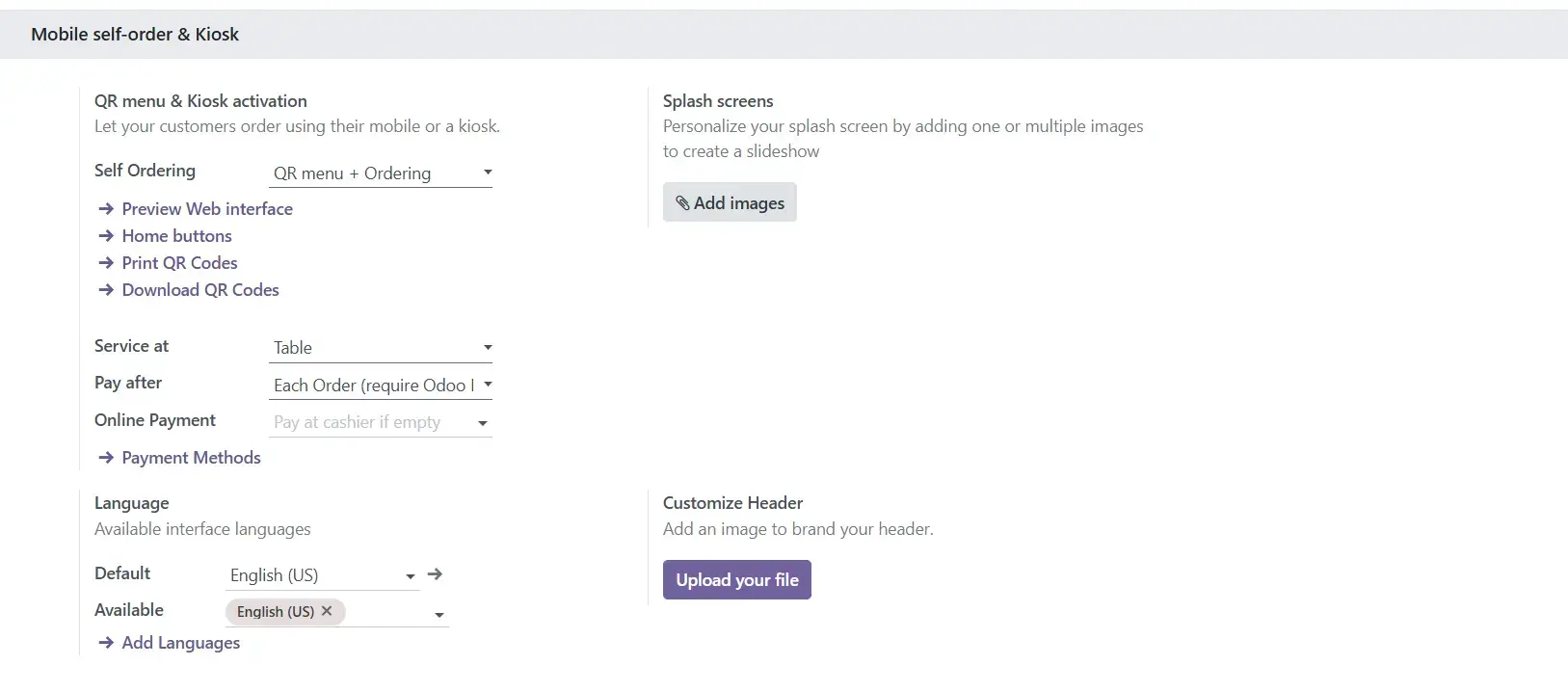
Step 6: Test the Mobile Menu
.webp)
Step 7: Go Live
Once you’re satisfied with the setup, share the QR code or link to your mobile menu with your customers.
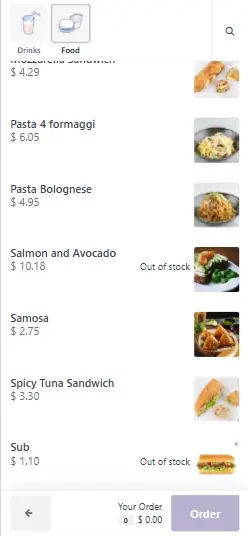
A mobile-friendly menu is no longer a luxury—it’s a necessity for modern restaurants. With Odoo POS, setting up and managing a mobile menu is simple and efficient.
Get started with Odoo POS today and see how it can simplify your operations, enhance customer satisfaction, and boost your sales. Contact us for a free demo or consultation!
1. Is Odoo POS suitable for small restaurants?
Absolutely! Odoo POS is flexible and can be customized to fit restaurants of any size, whether you’re running a small café or a large chain.
2. Do I need technical skills to set up a mobile menu?
Not at all. Odoo POS offers a user-friendly interface, and most features can be set up with basic instructions.
3. Can customers pay through the mobile menu?
Yes, you can enable online payment options or let customers pay at the counter after placing their order.
4. Is the mobile menu customizable?
Yes, you can customize the layout, branding, and even the add-on options to match your restaurant’s style.
5. What devices are compatible with the Odoo POS mobile menu?
The mobile menu works on any device with a browser, including smartphones, tablets, and laptops.
Let Odoo take your business to the next level!
Contact us and take the next step!
Follow Our Adventures!

Ready to launch your next project?

Company
Copyright © 2020. micra.digital. All rights reserved.