
- Company
Managing purchase orders, RFQs, vendors, and vendor bills across multiple screens can make procurement workflows slower and harder to monitor. Businesses need more than basic purchase order management; they need real-time purchase analytics and faster vendor billing.
The Purchase Analytics Dashboard & Bill for Odoo 19 brings procurement insights and billing actions together in one convenient interface. With an interactive OWL Purchase Dashboard, real-time KPI cards, Doughnut and Bar charts, and an instant Create Bill option after Purchase Order confirmation, procurement teams can work faster and make better decisions.
Whether you manage a small purchasing team or a large procurement operation, this solution transforms purchase data into actionable insights directly in Odoo 19.
Purchase Analytics Dashboard & Bill is an Odoo 19 enhancement designed to simplify purchase analytics, procurement monitoring, and vendor billing.
Instead of manually checking different menus for purchase orders, pending RFQs, vendors, and billing statuses, users can access key purchase information through an interactive dashboard.
The solution combines:
Built using the native Odoo 19 OWL framework, the dashboard provides a modern and responsive procurement analytics experience.
Traditional procurement monitoring often requires users to move between different Odoo menus to understand what is happening with purchasing activities.
For example, a purchasing manager may need to check:
When this information is spread across different screens, analyzing procurement performance can take unnecessary time.
A Purchase Analytics Dashboard provides a centralized view of this information, helping procurement teams quickly identify purchasing trends, pending activities, and supplier activity.
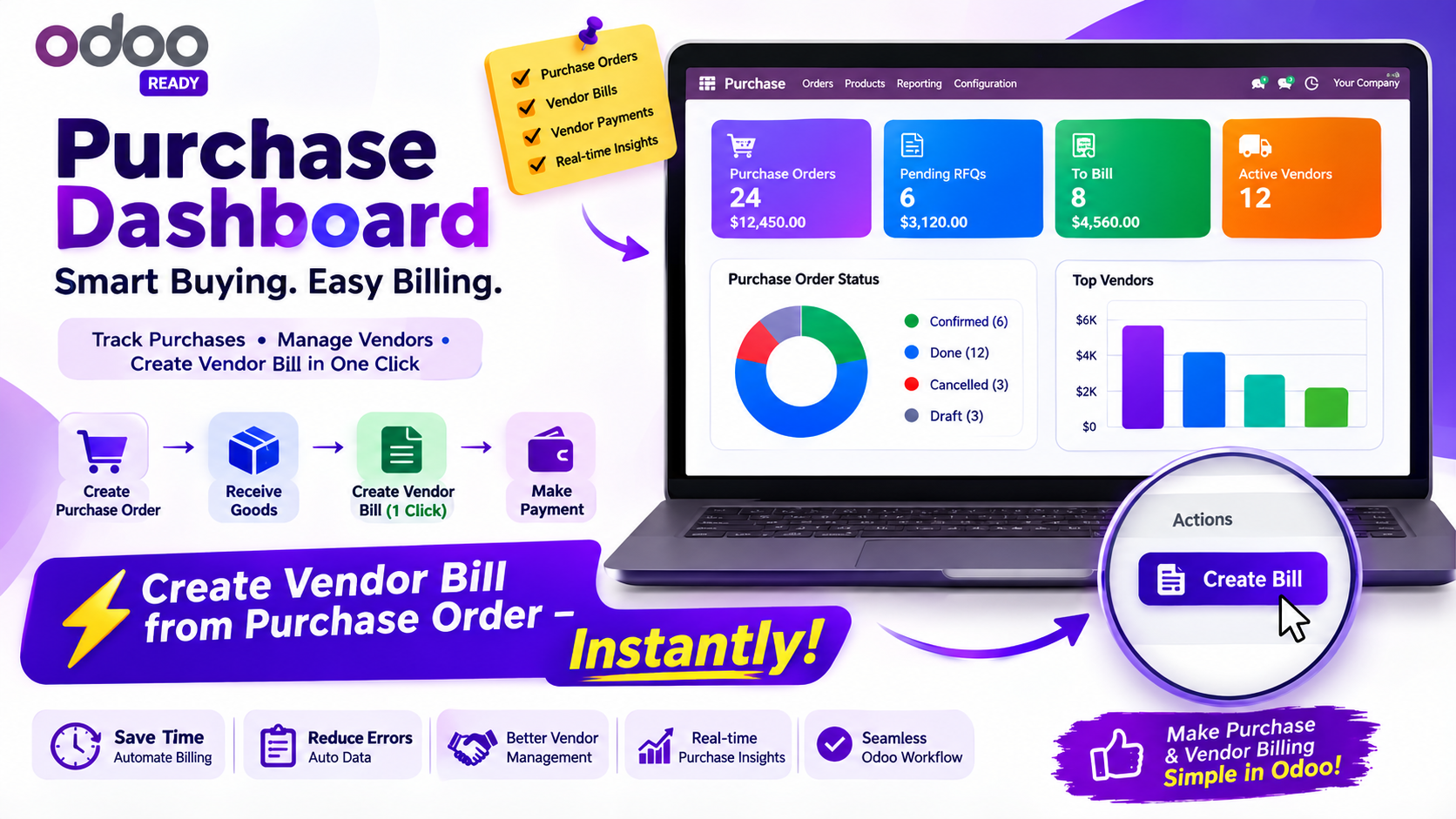
The core of the solution is an interactive OWL Purchase Dashboard designed specifically for Odoo 19.
The dashboard provides four KPI cards that give users an immediate overview of purchasing activity.
View the number of Purchase Orders being managed and get a quick understanding of current procurement activity.
Track Requests for Quotation that are still awaiting confirmation and identify purchasing activities that require attention.
See the number of purchase transactions that are ready for vendor billing.
Monitor the number of vendors currently involved in purchasing operations.
These KPI cards provide procurement teams with an at-a-glance view before they move into deeper analysis.
The interactive Doughnut Chart provides a visual breakdown of purchase order statuses.
Instead of reviewing individual orders to understand their distribution, users can view the status information graphically.
This can help purchasing managers quickly identify:
Visual reporting makes it easier to understand procurement data without manually reviewing large order lists.
Supplier performance and purchasing value are important aspects of procurement management.
The Top Vendors Bar Chart provides a visual representation of vendors based on purchase value.
Procurement managers can use this information to understand:
This makes the dashboard useful not only for monitoring transactions but also for gaining better visibility into supplier relationships.
One of the key features of this solution is Instant Bill Creation.
Normally, businesses may follow a workflow where a Purchase Order is confirmed, and users wait for the related receipt or another step before creating the vendor bill.
With the Instant Create Bill option, users can create a draft Vendor Bill immediately after confirming the Purchase Order based on the ordered quantities.
This can be particularly useful for businesses where vendor billing does not need to wait for physical goods receipt.
The workflow is simple:
Confirm Purchase Order → Create Bill → Generate Draft Vendor Bill
After confirming a Purchase Order, the highlighted Create Bill button becomes available according to the configured policy.
Users can click the button to generate a draft Vendor Bill for the ordered product quantities.
This reduces unnecessary navigation and helps accounting teams start the billing process sooner.
The Instant Bill feature follows an Ordered Quantity Control Policy, allowing businesses to create Vendor Bills based on the quantities ordered.
This can be useful for procurement workflows where invoices are generated based on the Purchase Order rather than waiting for quantities received.
It provides greater flexibility for businesses with different procurement and vendor billing processes.
The dashboard brings important procurement metrics together in real time.
Users can monitor:
Having these metrics available in one location reduces the need to manually collect information from multiple Odoo screens.
Numbers alone do not always provide an immediate understanding of procurement performance.
The dashboard uses interactive visualizations to make purchase information easier to interpret.
The Purchase Status Doughnut Chart shows the distribution of purchase order statuses.
The Top Vendors Bar Chart highlights vendors according to purchase value.
Together, these charts help purchasing managers understand procurement activity more quickly.
The dashboard also includes a Recent Purchase Orders table.
This provides quick access to recently created or processed purchasing transactions, allowing users to move from analytics to individual orders without unnecessary navigation.
It creates a practical connection between purchase reporting and purchase order management.
The Purchase Analytics Dashboard is integrated directly into the Orders menu.
Users can access purchase analytics without searching through separate applications or interfaces.
The dashboard also includes a convenient 1-click Back to Orders option.
This allows users to quickly move between:
Purchase Orders → Dashboard Analytics → Purchase Orders
The simple navigation helps maintain a smooth procurement workflow.
The workflow can be completed in three simple steps.
Create a new RFQ or select an existing Request for Quotation.
Review the vendor, products, quantities, and pricing, then click Confirm Order.
The RFQ becomes a confirmed Purchase Order.
After confirmation, the Create Bill option becomes available according to the configured billing policy.
Click Create Bill to generate a draft Vendor Bill using the ordered quantities.
Open the Purchase Dashboard from the Orders menu.
Review KPI cards, purchase status charts, top vendors, billing information, and recent orders from one centralized dashboard.
Four visual KPI cards provide instant visibility into:
Visualize procurement data through:
Generate draft Vendor Bills immediately after Purchase Order confirmation without waiting for physical goods receipt when the ordered-quantity billing policy applies.
The dashboard is developed using the native Odoo 19 OWL component framework, providing a modern Odoo user experience.
Interactive Doughnut and Bar charts provide visual purchase analytics and supplier insights.
Move between the Purchase Dashboard and Orders menu using the convenient 1-click Back navigation.
Review recent Purchase Orders directly from the dashboard and quickly access relevant purchasing information.
Our Other Apps - Sales Commission Manager in Odoo 19: Automate Sales Commissions & Payouts
Implementing purchase analytics within Odoo can provide several operational benefits.
Procurement managers can see important purchase metrics without manually checking multiple menus.
Top Vendor analytics make it easier to understand purchasing value across suppliers.
Instant Vendor Bill creation helps businesses start the billing process immediately after order confirmation, where applicable.
Visual purchase analytics help managers identify purchasing patterns and areas that need attention.
Centralized reporting reduces the need to manually collect and compare purchase information.
Integrated dashboard navigation makes it easier to switch between analytics and Purchase Orders.
Procurement teams can monitor Purchase Orders, pending RFQs, vendors, and billing status from one dashboard.
Purchasing managers can analyze order activity and supplier purchasing values using interactive charts.
Accounts payable teams can identify orders that are ready for billing and create draft Vendor Bills without unnecessary delays.
Business leaders can use visual purchasing analytics to understand procurement trends and supplier activity.
Businesses that need to create vendor bills immediately after confirming a Purchase Order can use the Instant Bill feature to speed up their workflow.
Purchasing managers can use the Top Vendors chart to identify suppliers associated with higher purchasing values.
Procurement teams can use the Pending RFQ KPI to identify quotations that still require action.
Managers can use the dashboard's KPI cards and charts to get a quick overview of purchasing activity.
Odoo already provides powerful purchase management capabilities. However, businesses often need more convenient reporting and workflow improvements tailored to their operational requirements.
A dedicated Purchase Analytics Dashboard adds an analytics-focused layer to the procurement workflow while keeping users within Odoo.
By combining purchase analytics, vendor insights, billing automation, and dashboard navigation, businesses can reduce manual monitoring and improve procurement efficiency.
Effective procurement management requires more than creating Purchase Orders. Businesses need clear visibility into purchasing activity, supplier performance, pending RFQs, and billing status.
The Purchase Analytics Dashboard & Bill for Odoo 19 brings these capabilities together through an interactive OWL dashboard, real-time KPI cards, Doughnut and Bar charts, recent order visibility, and convenient navigation.
The Instant Create Bill feature further improves the workflow by allowing businesses to generate draft Vendor Bills immediately after Purchase Order confirmation based on ordered quantities, where the configured billing policy allows it.
For organizations looking to make Odoo 19 purchase management smarter, more visual, and more efficient, this solution provides a practical way to bring procurement analytics and vendor billing closer together.
A Purchase Analytics Dashboard provides a centralized view of procurement metrics such as Purchase Orders, pending RFQs, billing status, active vendors, and supplier purchasing values.
Yes. With the Instant Create Bill feature, users can generate a draft Vendor Bill immediately after Purchase Order confirmation based on ordered quantities, according to the configured billing policy.
The dashboard includes an interactive Purchase Status Doughnut Chart and a Top Vendors Bar Chart for visual procurement analysis.
Yes. The dashboard is built using the native Odoo 19 OWL component framework and includes interactive chart functionality.
Procurement teams, purchasing managers, accounts payable departments, business owners, and executives can use the dashboard to monitor and analyze purchasing operations.
Let Odoo take your business to the next level!
Contact us and take the next step!
Follow Our Adventures!

Ready to launch your next project?
Company
Copyright © 2020. micra.digital. All rights reserved.