- Company
Every business receives invoices, bills, receipts, and purchase documents every day. While these documents are important for accounting, purchasing, inventory, and sales, manually entering all the information into an ERP system takes time and increases the chances of mistakes.
Imagine receiving hundreds of supplier invoices every week. Someone has to read each bill, create products if they don't exist, add vendor details, create purchase orders, update inventory, and verify every line item. This repetitive work slows down operations and keeps employees busy with manual tasks instead of more valuable work.
This is where the AI OCR Bill Scanner for Odoo ERP changes the game.
Powered by Groq AI, this module automatically reads invoices, receipts, and purchase documents using advanced OCR (Optical Character Recognition) and AI vision technology. It extracts important information, creates transactions, matches products and partners, and even updates inventory automatically.
In this blog, we'll explore how the AI OCR Bill Scanner works, its features, benefits, and why it's becoming an essential tool for businesses using Odoo ERP.
An AI OCR Bill Scanner is an intelligent document processing solution that reads printed or digital invoices and converts them into structured business data.
Instead of typing information manually, the AI extracts details such as:
The extracted information is then used to automatically create transactions inside Odoo ERP.
Unlike traditional OCR software that only reads text, this module combines OCR with Groq AI, allowing it to understand documents more accurately and make smart decisions while processing them.
Many businesses still rely on manual data entry for invoices and purchase documents.
This creates several challenges:
As invoice volumes increase, these problems become even bigger.
Automation removes these repetitive tasks and helps businesses process documents much faster.
The module goes far beyond simple OCR.
Instead of only extracting text, it can:
It acts more like an intelligent assistant than a traditional OCR scanner.
The module uses Groq AI for intelligent document understanding.
Groq AI processes:
The AI identifies key information even if different suppliers use different invoice formats.
This makes the solution flexible for businesses working with multiple vendors.
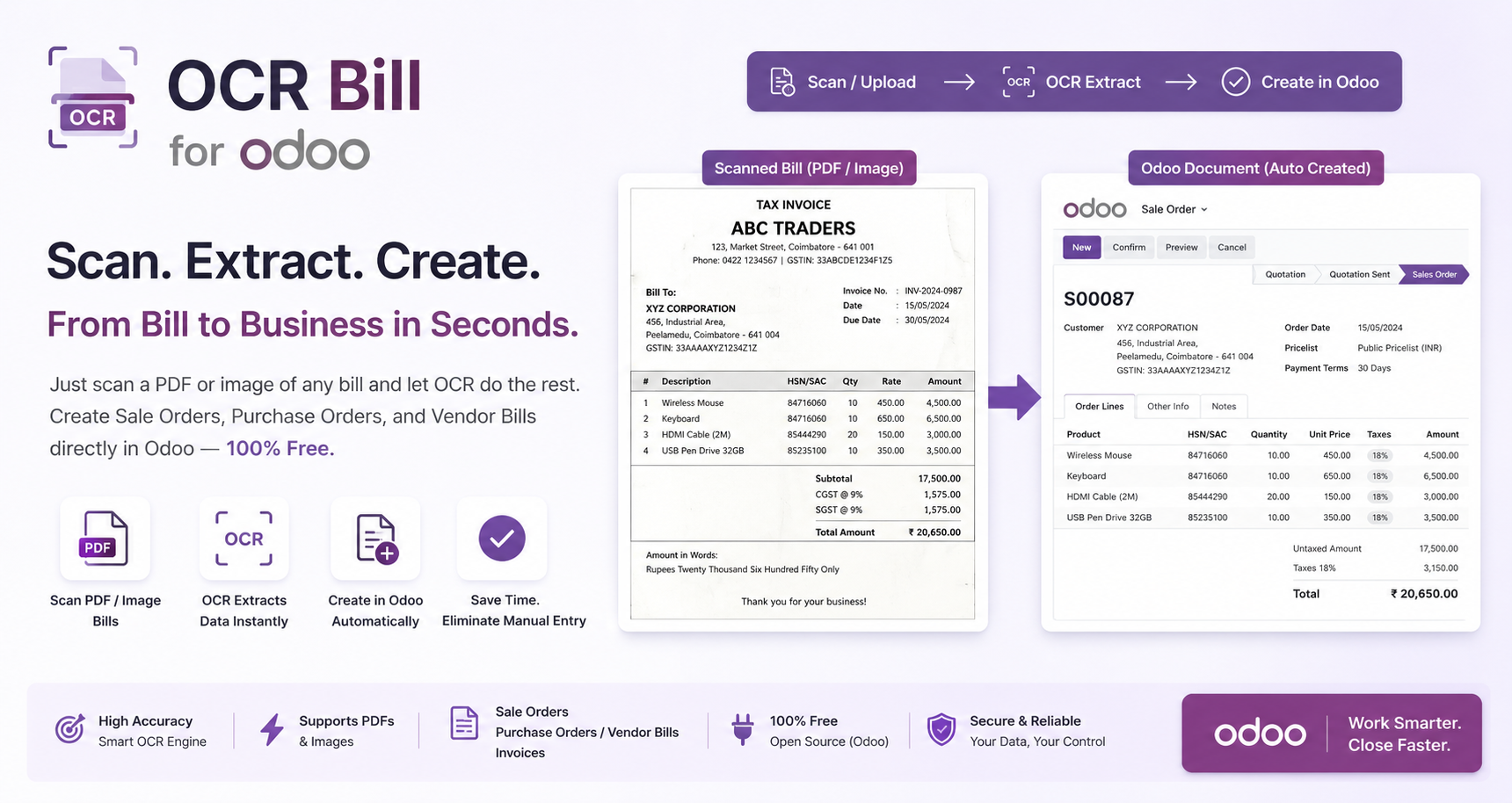
The workflow is simple and designed for speed.
Users can:
The custom camera widget built into Odoo makes document capture easy on both desktop and mobile devices.
After uploading the document, users simply click:
Process with Groq AI
The system automatically:
Everything happens in seconds.
One of the biggest strengths of this module is intelligent matching.
Instead of creating duplicate records, the system searches existing Odoo data using:
If a matching record exists, it uses it automatically.
If no match is found, it creates a new product or partner.
This keeps your database clean while reducing manual work.
Depending on the document type, the module creates:
Users no longer need to create these documents manually.
Once the transaction is created, the system can automatically:
This ensures stock levels always remain accurate.
Extracts invoice information using advanced Groq AI instead of basic OCR technology.
This provides higher accuracy and better document understanding.
Users can scan documents instantly using:
No third-party applications are required.
If a product does not already exist in Odoo, the module creates it automatically.
This saves significant setup time.
The module also creates new suppliers whenever necessary.
No need to enter partner information manually.
Instead of exact matching only, the module intelligently compares:
This greatly reduces duplicate records.
All scanned documents appear inside a modern Kanban pipeline.
Users can easily monitor every document through stages such as:
Color-coded cards make document tracking simple.
The module includes powerful reporting views including:
Managers can monitor document processing performance in real time.
Users can open generated transactions directly from the Kanban board.
Whether it's:
Everything is only one click away.
Groq AI API keys are managed securely through Odoo settings.
Only authorized administrators can configure the integration.
Explore our other App - Sales Order Auto Delivery in Odoo: Speed Up Order Confirmation and Delivery Validation
Documents that once required several minutes can now be processed in seconds.
Employees spend less time typing information.
Instead, they focus on higher-value work.
AI reduces typing mistakes while automatically recognizing invoice details.
Stock updates happen automatically as transactions are processed.
Inventory always stays up to date.
Businesses save money by reducing repetitive administrative work.
The Kanban dashboard gives managers a complete overview of document processing.
Teams can process significantly more invoices each day without increasing manpower.
Unlike ordinary OCR applications, this module provides a visual workflow.
Every scanned document is displayed with:
Users immediately know which documents need attention.
This creates a much better user experience than traditional document lists.
Invoices from different suppliers often describe the same product differently.
Traditional systems struggle with this.
The AI OCR Bill Scanner intelligently compares:
This improves matching accuracy while avoiding duplicate products.
One of the most valuable features is automatic inventory synchronization.
After processing invoices, the module can:
This eliminates another manual task for warehouse teams.
Managers can analyze document processing using built-in dashboards.
Reports include:
These reports help businesses measure automation success.
The AI OCR Bill Scanner is suitable for many industries.
Automatically process supplier invoices and update raw material inventory.
Convert supplier delivery notes directly into Purchase Orders.
Quickly process incoming stock and customer invoices.
Capture delivery documents using mobile devices and update inventory instantly.
Reduce paperwork by automating invoice entry and stock updates.
Minimize repetitive invoice data entry while improving accuracy.
Odoo ERP connects every department in one platform.
With the AI OCR Bill Scanner, scanned documents automatically flow into:
There is no need to move data between multiple systems.
Everything stays connected.
At Micra Digital, we develop intelligent Odoo solutions that help businesses automate everyday operations.
Our expertise includes:
We help businesses reduce manual work while improving efficiency through practical automation.
Manual invoice entry is one of the most repetitive tasks in any business.
The AI OCR Bill Scanner transforms this process by combining Groq AI with Odoo ERP to automatically extract data, create transactions, update inventory, and monitor everything through an intuitive dashboard.
Whether you're processing supplier invoices, customer bills, purchase receipts, or warehouse documents, this module saves time, improves accuracy, and keeps your operations running smoothly.
If your team spends hours entering invoice data every week, it's time to let AI do the work.
Ready to eliminate manual invoice entry and speed up your Odoo workflow?
Micra Digital can help you implement the AI OCR Bill Scanner and customize it to match your business processes.
Contact our team today for a free consultation and discover how AI-powered document automation can improve your business.
The AI OCR Bill Scanner is an Odoo module that uses Groq AI to extract data from invoices, receipts, and PDFs, then automatically creates transactions and updates inventory.
The module supports PDF files, invoice images, supplier bills, receipts, and documents captured using a mobile or desktop camera.
Yes. If a product doesn't exist in Odoo, the module can automatically create it after extracting information from the scanned document.
Yes. It can automatically confirm Purchase Orders or Sales Orders and validate incoming or outgoing stock transfers to keep inventory synchronized.
Micra Digital specializes in Odoo ERP implementation, AI-powered automation, custom module development, integrations, and support to help businesses improve productivity.
Let Odoo take your business to the next level!
Contact us and take the next step!
Follow Our Adventures!

Ready to launch your next project?
Company
Copyright © 2020. micra.digital. All rights reserved.